Friday, January 1, 2016

Calculate kernel parameters for running Oracle 11g Release 2 on RHEL Linux

Values required by Oracle according to the documentation


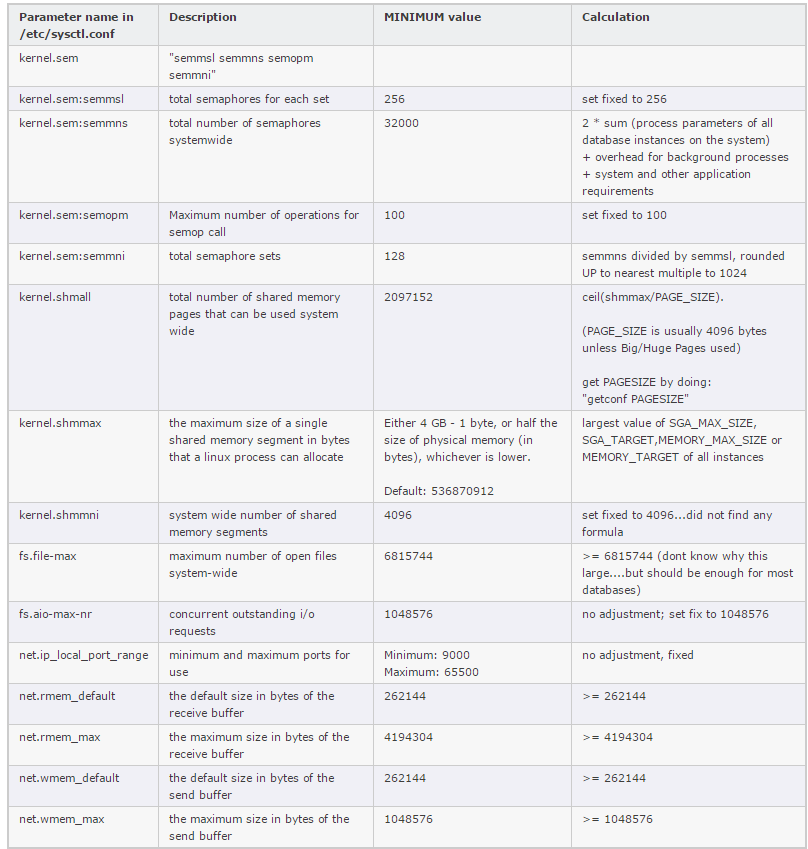
The following tables list the required MINIMUM values


Calculate the required values

The following table shows calculation formulas for setting the required kernel parameters for running oracle 11g release 2 on Linux.


The shell limits shown above should be enough initially. However if you have many data files (> 1000) i would increase the number of open files by doubling the value. All other parameters are sized big enough for almost every environment.
For using the new Automatic Memory Management Feature which automatically sized SGA and PGA Oracle uses a pseudo file system /dev/shm. If activating this feature by setting MEMORY_MAX_SIZE or MEMORY_TARGET in your init.ora you have to size /dev/shm appropriately. The following table outlines how to do it:


Thursday, December 31, 2015

Performing Tablespace-Level Recovery

In this post I want to explain how to Tablespace-Level Recovery when we have lost all the datafiles contained in one tablespace.

For performing Tablespace-Level Recovery you should have the following conditions:

1.       We have online redo log files.
2.       We have a healthy backup.
3.       We have all archived redo logfiles.

Also we have two solution. First solution is while database open and second is while database not open.

1.     Recover While database Not open:

RMAN> connect target /
RMAN> startup mount;
RMAN> restore tablespace <TABLESPACE NAME>;
RMAN> recover tablespace <TABLESPACE NAME>;
RMAN> alter database open;

2.       Recover While database open:

RMAN> connect target /
RMAN> sql ‘alter tablespace <TABLESPACE NAME> offline immediate’;
RMAN> restore tablespace <TABLESPACE NAME>;
RMAN> recover tablespace <TABLESPACE NAME>;
RMAN> sql ‘alter tablespace <TABLESPACE NAME> online’;


This method of taking tablespace offline and then restore , recover and then back to online would work for every tablespace except SYSTEM and UNDO tablespace.

Wednesday, December 30, 2015

Performing Database point-in-time recovery (DBPITR) - Time-Based Recovery

In this post I want to explain how to Time-Based recovery to perform Incomplete recovry.

STEP 1:- Start the database in mount mode.

RMAN> connect target /
RMAN> startup mount;

STEP 2:- Use the RMAN Set Until Time clause and set the time to the point in Time till where you want to restore recover the database.  RMAN will restore and recover the database up to, but not including, the specified time.

RMAN> set until time “to_date(’05-aug-2015 14:32:00′, ‘dd-mon-rrrr hh24:mi:ss’)”;

STEP 3:- Restore the Database

RMAN> restore database;

STEP 4:- Recover the Database

RMAN> recover database;

STEP 5:- Open the database with resetlogs.

RMAN> alter database open resetlogs;


Use the following script:-

connect target /
startup mount;
run{
set until time “to_date(’05-oct-2015 13:00:00′, ‘dd-mon-rrrr hh24:mi:ss’)”;
restore database;
recover database;
}

alter database open resetlogs;


Performing Database-Level Recovery

In this post I want to explain how to do complete database level recovery when we have lost all the datafiles.

For performing Database level recovery you should have the following conditions:

1.       We have online redo log files.
2.
       We have a healthy backup.
3.
       We have all archived redo logfiles.

Now we do recovery steps:
1.     Start database in nomount state:
Sql> shut  immediate;
Sql> startup nomount;

2.     Restore control file :
RMAN> restore controlfile from autobackup;

3.     Mount database:
RMAN>alter database mount;

4.     Restore and Recover database:

RMAN>run
{
Restore database;
Recover database;
}
5.     Open database with resetlogs option:
SQL> alter database open resetlogs;

All Steps :
RMAN> connect target /
RMAN> startup nomount;
RMAN> restore controlfile from autobackup;
RMAN> alter database mount;
RMAN> restore database;
RMAN> recover database;
RMAN> alter database open resetlogs;


Performing Database point-in-time recovery (DBPITR) - SCN-Based Recovery

In this post I want to explain how to do SCN-Based recovery to a particular database SCN. In this scenario we want to recover database to specify SCN. For example we’ll create a table and drop it .
And then we recover dropped table .

DBPITR is sometimes called incomplete recovery because it does not use all of the available redo or completely recover all changes to your database.


SQL> Create table  TEST_SCN
    AS
    SELECT * FROM HR.EMPLOYEES;
Table created.

SQL> SELECT COUNT(*) FROM TEST_SCN;

 COUNT(*)
----------
      3424

SQL> SELECT GROUP# ,SEQUENCE# ,STATUS , ARCHIVED , FIRST_CHANGE# FROM V$LOG;

    GROUP#  SEQUENCE#   STATUS           ARC    FIRST_CHANGE#
---------- ----------                   ----------------       ---       ------------
         1          0                        UNUSED            YES       0
         2          0                        UNUSED            YES       0
         3          1                        CURRENT          NO         678956

SQL> ALTER SYSTEM SWITCH LOGFILE;


SQL> SELECT GROUP# ,SEQUENCE# ,STATUS , ARCHIVED , FIRST_CHANGE#
    FROM V$LOG;

    GROUP#  SEQUENCE# STATUS           ARC          FIRST_CHANGE#
---------- ---------- ----------------                        ---            -------------
         1          2 ACTIVE                                YES            689996
         2          3 CURRENT                             NO             689998
         3          1 ACTIVE                                YES            678956

Copy SCN  689998  because we need it for recovery.

RMAN> BACKUP DATABASE PLUS ARCHIVELOG ALL;

SQL> DROP TABLE HR.TEST_SCN PURGE;

 SQL> SHUT IMMEDIATE;
SQL> STARTUP MOUNT;

REMEMBER WE HAVE COPIED THE CURRENT SCN NUMBER

RMAN> RESTORE DATABASE UNTIL SCN 689998;
RMAN> RECOVER DATABASE UNTIL SCN 689998;
RMAN> ALTER DATABASE OPEN RESETLOGS;

SQL> SELECT COUNT(*) FROM TEST_SCN;

  COUNT(*)
----------
      3424


Also If you have set the initialization parameter log_checkpoints_to_alert to TRUE, then every time a log switch occurs, Oracle will write the SCN of each checkpoint to your target database alert.log file. This feature can be handy when trying to determine historical checkpoint SCN activity.

database point-in-time recovery (DBPITR) - Log Sequence–Based Recovery

In this post I want to explain how to do Log sequence-Based recovery. In this case we want to recover whole database from last good backup but, we don’t have all the archivelog files and also we don’t have backup of all archivelog files. Hence Rman allows you to apply redo up specific archive redo log file by specifying sequence number.

·         Recover Steps:

To get the Sequence Number you can use the below query with time:-

SQL>select sequence#, first_change#, first_time from v$log_history order by first_time;

RMAN> rman target /

RMAN> startup mount;

RMAN> run{
2> set until sequence <SEQUENCE NUMBER> thread <THREAD NUMBER>;
3> restore database;
4> recover database;
5> }

RMAN> alter database open resetlogs;


Performing Datafile-Level Recovery

In this post I want to explain how to do datafile level recovery when we have lost  some datafiles.

For performing Datafile  level recovery you should have the following conditions:

1.       We have online redo log files.
2.
       We have a healthy backup.
3.
       We have all archived redo logfiles.

Also we have two solution. First solution is while database open and second is while database not open.

1.     Recover While database Not open:

RMAN> connect target /
RMAN> startup mount;
RMAN> restore datafile ‘<Datafile NAME or Number>’;
RMAN> recover datafile ‘<Datafile NAME or Number>’;
RMAN> alter database open;

2.       Recover While database open:

RMAN> connect target /
RMAN> sql “alter database datafile ‘<Datafile NAME or Number>’ offline”;
RMAN> restore datafile ‘<Datafile NAME or Number>’;
RMAN> recover datafile ‘<Datafile NAME or Number>’;
RMAN> sql “alter database datafile ‘<Datafile NAME or Number>’ online”;