Showing posts with label Oracle New features. Show all posts

Sunday, May 8, 2016

Multiprocess and Multithreaded Oracle Database


Multithreaded Configuration
A process is a mechanism in an operating system that can run a series of steps. The process execution architecture depends on the operating system. For example, on Windows an Oracle background process is a thread of execution within a process. On Linux and UNIX, an Oracle process is either an operating system process or a thread within an operating system process.

Types of Processes
A database instance contains or interacts with the following types of processes:
·         A client process runs the application or Oracle tool code.
·         An Oracle process is a unit of execution that runs the Oracle database code. In the multithreaded architecture, an Oracle process can be an operating system process or a thread within an operating system process. Oracle processes include the following subtypes:
·         A background process starts with the database instance and perform maintenance tasks such as performing instance recovery, cleaning up processes, writing redo buffers to disk, and so on.
·         A server process performs work based on a client request.

Oracle database running on Linux uses the same architecture and every process like LGWR, DBWR, SMON has it’s own OS processes. The resources consumed are visible in OS level process monitoring tools.Oracle 12c database has the same architecture. The below command was run on fresh install of 12c database.

ps -ef | grep [o]ra_
oracle 2191 1 0 06:07 ? 00:00:00 ora_pmon_cdb12c
oracle 2193 1 0 06:07 ? 00:00:00 ora_psp0_cdb12c
oracle 2195 1 31 06:07 ? 00:00:20 ora_vktm_cdb12c
oracle 2199 1 0 06:07 ? 00:00:00 ora_gen0_cdb12c
oracle 2201 1 0 06:07 ? 00:00:00 ora_mman_cdb12c
oracle 2205 1 0 06:07 ? 00:00:00 ora_diag_cdb12c
oracle 2207 1 0 06:07 ? 00:00:00 ora_dbrm_cdb12c
oracle 2209 1 0 06:07 ? 00:00:00 ora_dia0_cdb12c
oracle 2211 1 0 06:07 ? 00:00:00 ora_dbw0_cdb12c
oracle 2213 1 0 06:07 ? 00:00:00 ora_lgwr_cdb12c
oracle 2215 1 0 06:07 ? 00:00:00 ora_ckpt_cdb12c
oracle 2217 1 0 06:07 ? 00:00:00 ora_smon_cdb12c
oracle 2219 1 0 06:07 ? 00:00:00 ora_reco_cdb12c
oracle 2221 1 0 06:07 ? 00:00:00 ora_lreg_cdb12c
oracle 2223 1 5 06:07 ? 00:00:03 ora_mmon_cdb12c
oracle 2225 1 0 06:07 ? 00:00:00 ora_mmnl_cdb12c
oracle 2227 1 0 06:07 ? 00:00:00 ora_d000_cdb12c
oracle 2229 1 0 06:07 ? 00:00:00 ora_s000_cdb12c
oracle 2241 1 0 06:07 ? 00:00:00 ora_tmon_cdb12c
oracle 2243 1 0 06:07 ? 00:00:00 ora_tt00_cdb12c
oracle 2245 1 0 06:07 ? 00:00:00 ora_smco_cdb12c
oracle 2247 1 0 06:07 ? 00:00:00 ora_aqpc_cdb12c
oracle 2266 1 0 06:07 ? 00:00:00 ora_w000_cdb12c
oracle 2270 1 6 06:07 ? 00:00:03 ora_p000_cdb12c
oracle 2272 1 6 06:07 ? 00:00:03 ora_p001_cdb12c
oracle 2274 1 0 06:07 ? 00:00:00 ora_p002_cdb12c
oracle 2276 1 0 06:07 ? 00:00:00 ora_p003_cdb12c
oracle 2279 1 0 06:07 ? 00:00:00 ora_qm02_cdb12c
oracle 2283 1 0 06:07 ? 00:00:00 ora_q002_cdb12c
oracle 2285 1 0 06:07 ? 00:00:00 ora_q003_cdb12c
oracle 2309 1 0 06:07 ? 00:00:00 ora_p004_cdb12c
oracle 2311 1 1 06:07 ? 00:00:00 ora_p005_cdb12c
oracle 2329 1 5 06:08 ? 00:00:01 ora_cjq0_cdb12c
oracle 2333 1 2 06:08 ? 00:00:00 ora_p006_cdb12c
oracle 2335 1 2 06:08 ? 00:00:00 ora_p007_cdb12c
oracle 2338 1 0 06:08 ? 00:00:00 ora_vkrm_cdb12c
oracle 2346 1 0 06:08 ? 00:00:00 ora_p008_cdb12c
oracle 2348 1 0 06:08 ? 00:00:00 ora_p009_cdb12c
oracle 2350 1 0 06:08 ? 00:00:00 ora_p00a_cdb12c
oracle 2352 1 0 06:08 ? 00:00:00 ora_p00b_cdb12c
oracle 2354 1 2 06:08 ? 00:00:00 ora_j000_cdb12c
oracle 2356 1 4 06:08 ? 00:00:00 ora_j001_cdb12c
oracle 2358 1 1 06:08 ? 00:00:00 ora_j002_cdb12c
oracle 2360 1 2 06:08 ? 00:00:00 ora_j003_cdb12c
oracle 2362 1 3 06:08 ? 00:00:00 ora_j004_cdb12c
oracle 2364 1 2 06:08 ? 00:00:00 ora_j005_cdb12c
oracle 2366 1 2 06:08 ? 00:00:00 ora_j006_cdb12c
oracle 2368 1 3 06:08 ? 00:00:00 ora_j007_cdb12c
oracle 2370 1 1 06:08 ? 00:00:00 ora_j008_cdb12c
oracle 2372 1 2 06:08 ? 00:00:00 ora_j009_cdb12c
oracle 2374 1 1 06:08 ? 00:00:00 ora_j010_cdb12c
oracle 2376 1 1 06:08 ? 00:00:00 ora_j011_cdb12c
oracle 2378 1 2 06:08 ? 00:00:00 ora_j012_cdb12c
oracle 2380 1 2 06:08 ? 00:00:00 ora_j013_cdb12c
oracle 2382 1 1 06:08 ? 00:00:00 ora_j014_cdb12c
oracle 2384 1 3 06:08 ? 00:00:00 ora_j015_cdb12c
oracle 2386 1 1 06:08 ? 00:00:00 ora_j016_cdb12c
oracle 2388 1 1 06:08 ? 00:00:00 ora_j017_cdb12c
oracle 2390 1 2 06:08 ? 00:00:00 ora_j018_cdb12c
oracle 2392 1 1 06:08 ? 00:00:00 ora_j019_cdb12c
oracle 2394 1 1 06:08 ? 00:00:00 ora_j020_cdb12c
oracle 2396 1 0 06:08 ? 00:00:00 ora_j021_cdb12c
oracle 2398 1 5 06:08 ? 00:00:00 ora_m000_cdb12c
$ ps -ef | grep [o]ra_|wc
40 320 2560

Multithreaded Configuration
Starting in Oracle 12c database, you can change this and enable the new Multithreaded configuration. You can change the architecture by making Oracle database use thread based architecture instead of process based. Once changed, all Oracle processes will be threads within a few Oracle processes. Thus if CPU moves from one Oracle process to the other, the time between the context switch will be reduced significantly as the switching from one thread to the other is within the same process. During testing, this has resulted in up to 30% performance improvements. You can use the following command in SQL*PLUS to view the current value of THREADED_EXECUTION parameter.
The choice of threading model is dictated by the THREADED_EXECUTION initialization parameter.
THREADED_EXECUTION=FALSE : The default value causes Oracle to run using the multiprocess model.
THREADED_EXECUTION=TRUE : Oracle runs with the multithreaded model.
To switch to the multithreaded model, simply set the THREADED_EXECUTION parameter and restart the database.
CONN sys AS SYSDBA
ALTER SYSTEM SET threaded_execution=TRUE SCOPE=SPFILE;
SHUTDOWN IMMEDIATE;
STARTUP;
If you encounter “ORA-01017: invalid username/password; logon denied” while restarting database then please refer to the end of this article under OS Authentication.
SQL> SHOW PARAMETER thread;
NAME TYPE VALUE
------------------------------------ ----------- ------------------------------
parallel_threads_per_cpu integer 2
thread integer 0
threaded_execution boolean TRUE


Also for all incoming requests to make use of this architecture you need to set the below mentioned parameter in Listener.ora file.
DEDICATED_THROUGH_BROKER_<listener-name>=ON


You need to provide your own Listener name at the end.
Now we will run the OS command again to check how many processes are created.
$ ps -ef | grep [o]ra_
oracle 2544 1 0 06:25 ? 00:00:00 ora_pmon_cdb12c
oracle 2546 1 0 06:25 ? 00:00:00 ora_psp0_cdb12c
oracle 2548 1 25 06:25 ? 00:01:47 ora_vktm_cdb12c
oracle 2552 1 0 06:25 ? 00:00:01 ora_u004_cdb12c
oracle 2558 1 9 06:25 ? 00:00:41 ora_u005_cdb12c
oracle 2564 1 0 06:25 ? 00:00:00 ora_dbw0_cdb12c
$ ps -ef | grep [o]ra_|wc
6 48 384
The number of processes have been reduced from 40 to 6. That is a huge plus and that’s because there isn’t a separate process for every Oracle process. Most of the Oracle processes are now threads within these 6 processes.
OS Authentication
When you enable Multithreaded configuration then you are not allowed to log into Oracle using OS level authentication. The following error will occur if you try to.
$ sqlplus / as sysdba
SQL*Plus: Release 12.1.0.1.0 Production on Sat Jul 6 06:40:39 2013
Copyright (c) 1982, 2013, Oracle. All rights reserved.
ERROR:
ORA-01017: invalid username/password; logon denied
Use the following method to log in as SYS.
Enter user-name: sys as sysdba
Enter password:
Connected to:
Oracle Database 12c Enterprise Edition Release 12.1.0.1.0 - 64bit Production
With the Partitioning, OLAP, Advanced Analytics and Real Application Testing options.

Wednesday, December 30, 2015

Oracle 12c Architecture

Oracle 12c Architecture


Recently I was refreshing my Oracle 12c Architecture knowledge, so I google’d around for an article for the same, to my surprise, I wasn’t able to find any good informative article explaining the Oracle 12c Architecture, hence comes this post.
In this post we’ll go through the Oracle 12c Architecture in as simple way as we can.
Multitenant Architecture.PNG
With 12c you might have always heard of multitenant architecture and Container & pluggable Database, so we’ll start with understanding these things. Also 12c configuration has following option:-
  • Multitenant configuration A CDB consists of zero, one, or more PDBs. You need to license the Oracle Multitenant option.
  • Single-tenant configuration Doesn’t require the licensed Oracle Multitenant option
  • Non-CDB This is the same as the pre–Oracle 12 c database  architecture.
So it doesn’t mean that 12c is only about multitenant configuration, it can be configured as the same way as your beloved 11g.
Multitenant Architecture
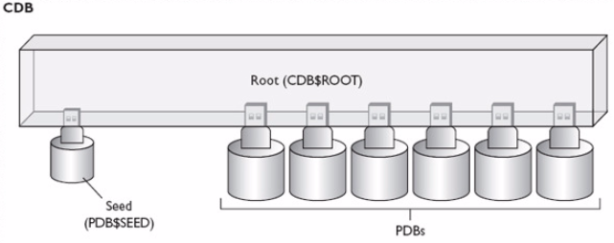
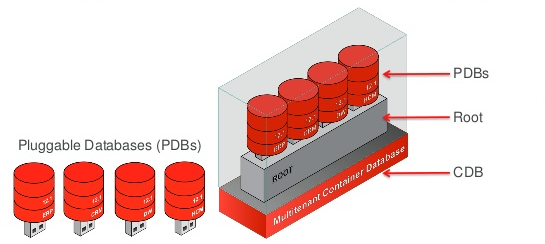
For those of you who have worked with SQL Server, Sybase etc this architecture won’t be new. Basically till 11g we used to have 1 instance for 1 database (excluding RAC cases for simplicity), so even you have a very small application you need to have a separate instance for that database, separate instance means memory, process and everything (But then Oracle was designed to handle large & critical databases). So with the changing requirements Oracle has changed its architecture where you can have multiple databases within a single instance. To build a little perspective on CDB (CDB$ROOT) and PDB think of this single instance as CDB and multiple databases as PDB.
oma.PNG
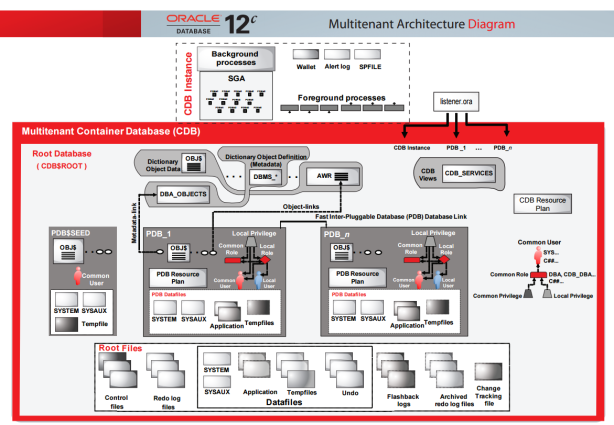
Now its time to understand what is CDB & PDB, how is memory allocated to these different PDB, how does CDB maintains PDBs, where’s REDO, where’s UNDO, etc.
CDB & PDB
cdba.PNG
A multitenant container database has three types of containers:
  • The Oracle supplied container is called the root container (CDB$ROOT) and consists of just Oracle metadata (and maybe a little bit of user data) and common users. Each CDB has one root.
  • The seed container is named PDB$SEED, and there is one of these per CDB. The purpose of the seed container isn’t to store user data—it’s there for you as a template to create PDBs.
  • The user container , which is actually called a pluggable database (or
    PDB), consists of user metadata and user data.
Each of these—the root, the seed, and the PDB(s)—is called a container, and each container has a unique container ID (CON_ID) and container name (CON_NAME). Each PDB also has a globally unique identifier (GUID)
The idea behind the concept of a container is to separate Oracle metadata and user data by placing the two types of data into separate containers. That is, the system and user data are separated. There’s a SYSTEM tablespace in both the central container and the PDB containers, however, they contain different types of data. The root container consists of Oracle
metadata whereas the PDB container’s SYSTEM tablespace contains just user metadata. The Oracle metadata isn’t duplicated by storing it in e
ach PDB—it’s stored in a central location for use by all the PDBs that are part of that CDB. The CDBs contain pointers to the Oracle metadata in the root container, thus allowing the PDBs to access these system objects without duplicating them in the PDBs
A CDB has similar background processes and files as a normal non-CDB database. However, some of the processes and files are common for both
a CDB and its member PDB databases, and some aren’t.
Common Entities between CDB and PDBs
  • Background processes There’s a single set of background processes for the CDB. The PDBs don’t have any background processes attached to them.
  • Redo log files These are common for the entire CDB, with Oracle annotating the redo data with the identity of the specific PDB associated with the change. There’s one active online redo log for a single-instance CDB or one active online redo log for each instance of an Oracle RAC CDB. A CDB also has a single set of archived redo log files.
  • Memory You allocate memory only to the CDB, because that’s the only instance you need in a multitenant database.
  • Control files These are common for the entire CDB and will contain information that reflects the changes in each PDB.
  • Oracle metadata All Oracle-supplied packages and related objects are shared.
  • Temporary tablespace There’s a common temporary tablespace for an entire CDB. Both the root and all the PDBs can use this temporary tablespace. This common tablespace acts as the default TEMP tablespace. In addition, each PDB can also have a separate temporary tablespace for its local users.
  • Undo tablespace All PDBs use the same undo tablespace. There’s one active undo tablespace for a single-instance CDB or one active undo tablespace for each instance of an Oracle RAC CDB.
A CDB contains a set of system data files for each container and a set of user-created data files for each PDB. Also CDB contains a CDB resource manager plan that allows resources management among the PDBs in that CDB.
Entities Exclusive for PDBs
  • Tablespaces for the applications tables and indexes These application tablespaces that you’ll create are specific to a PDB and aren’t shared with other PDBs, or the central CDB. The data files that are part of these tablespaces constitute the primary physical difference between a CDB and a non-CDB. Each data file is associated to a specific container.
  • Local temporary tablespaces Although the temporary tablespace for the CDB is common to all containers, each PDB can also create and use its own temporary tablespaces for its local users.
  • Local users and local roles Local users can connect only to the PDB where the users were created. A common user can connect to all the PDBs that are part of a CDB.
  • Local metadata The local metadata is specific to each application running in a PDB and therefore isn’t shared with other PDBs.
  • PDB Resource Manager Plan These plans allow resource management within a specific PDB. There is separate resource management at the CDB level.
The PDB containers have their own SYSTEM and SYSAUX tablespaces. However, they store only user metadata in the SYSTEM tablespace and not
Oracle metadata. Data files are associated with a specific container. A permanent tablespace can be associated with only one container. When you create a tablespace in a container, that tablespace will always be associated with that container.
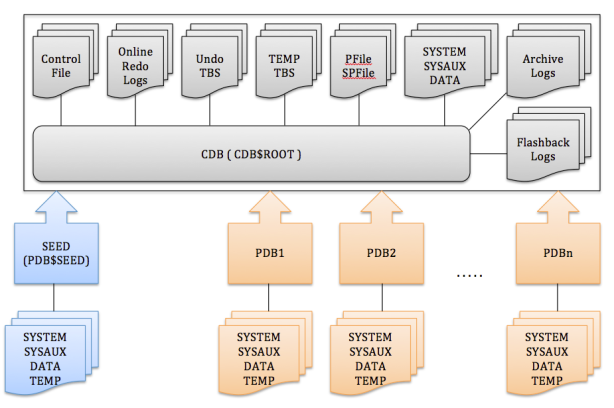
cdb (1)
Above diagram depicts what a CDB contains and what a PDB contains.
Hope this answers the basic ambiguity in mind regarding 12c, I’ll continue posting articles to cover further architecture internals along with How to administer and maintain a 12c database to give users a hands-on. The idea of these posts is to help the DBAs who have understanding of 11g but are yet not aware of 12c. From 12c with architecture everything has changed even the basic commands to administer and maintain a database. Hence sharing these posts to quickly adapt the 12c changes for 11g DBA.
Refrence 
https://nitishanandsrivastava.wordpress.com/oracle-12c-miscellaneous/oracle-12c-architecture/

Monday, November 16, 2015

New features in Oracle Database 12c Release 1

Oracle Database 12c, c for cloud, a multi-tenant database management system, with nearly 500 new features.


SQL:
  • Increased size limit for VARCHAR2, NVARCHAR2, and RAW datatypes to 32K  (from 4K).
  • We can make a column invisible. 
    SQL> create table test (column-name column-type invisible);
    SQL> alter table table-name modify column-name invisible; 

    SQL> alter table table-name modify column-name visible;
  • Oracle Database 12c has new feature called "Identity Columns" which are auto-incremented at the time of insertion (like in MySQL). 
    SQL> create table dept (dept_id number generated as identity, dept_name varchar);

    SQL> create table dept (dept_id number generated as identity (start with 1 increment by 1 cache 20 noorder), dept_name varchar);
  • Temporary undo (for global temporary tables) will not generate undo. We can manage this by using init parameter temp_undo_enabled (=false|true).
  • Duplicate Indexes - Create duplicate indexes on the same set of columns. Till Oracle 11.2, if we try to create an index using the same columns, in the same order, as an existing index, we'll get an error. In some cases, we might want two different types of index on the same data (such as in a datawarehouse where we might want a bitmap index on the leading edge of a set of columns that exists in a Btree index).
  • PL/SQL inside SQL: this new feature allows to use DDL inside SQL statements (i.e.: to create a one shot function)
  • The object DEFAULT clause has been enhanced. Adding a column to an existing table with a default value (much faster with Oracle 12c and it consumes less space than before, pointer to the Oracle Data Dictionary), applies also to sequences, identity types etc...
  • Pagination query, SQL keywords to limit the number of records to be displayed, and to replace ROWNUM records. 
    SQL> select ... fetch first n rows only; 

    SQL> select ... offset m rows fetch next n rows only; 

    SQL> select ... fetch first n percent rows only; 

    SQL> select ... fetch first n percent rows with ties;
  • Moving and Renaming datafile is now ONLINE, no need to put datafile in offline.
    SQL> alter database move datafile 'path' to 'new_path';
  • The TRUNCATE command has been enhanced with a CASCADE option which follows child records.
  • Reduces contents of regular UNDO, allowing better flashback operations.

PL/SQL:
  • PL/SQL Unit Security - A role can now be granted to a code unit. That means you can determine at a very fine grain, who can access a specific unit of code.
  • SQL WITH clause enhancement - In Oracle 12c, we can declare PL/SQL functions in the WITH clause of a select statement.
  • Implicit Result Sets - create a procedure, open a ref cursor, return the results. No types, not muss, no mess. Streamlined data access (kind of a catch up to other databases).
  • MapReduce in the Database - MapReduce can be run from PL/SQL directly in the database.
  • We can use Booleans values in dynamic PL/SQL. Still no Booleans as database type.

Database:
  • New background processes - LREG (Listener Registration), SA (SGA Allocator), RM.
  • RESOURCE role does not include UNLIMITED TABLESPACE anymore.
  • No need to shutdown database for changing archive log mode.
  • Like sysdba, sysoper & sysasm, we have new privileges, in Oracle 12.1.0.
    sysbackup for Backup operations
    sysdg for Data Guard operations
    syskm for Key management
  • Like sys, system, we have new default SYS users, in Oracle 12c Release1.
    sysbackup for Backup operations
    sysdg for Data Guard operations
    syskm for Key management
  • Oracle Database 12c Data Pump will allow turning off redo for the import operation (only).
    impdp ... transform=disable_archive_logging:y
  • expdp has transport view, view_as_tables options.
    $ expdp ... VIEWS_AS_TABLES=test_view
  • Enhanced statistics (Hybrid histograms for more than 254 distinct values, dynamic sampling up to eleven, and stats automatically gathered during load).
  • Row pattern matching - "MATCH_RECOGNIZATION" (identification of patterns within a table ordered/sorted by the SQL statement).
  • Adaptive execution plans (change of the plan at runtime).
  • Oracle 12c includes database level redaction, allowing granular control of access to sensitive data.
  • Multi threaded database with parameter threaded_executions. Multiple processes and multiple threads within each process, provides improved performance and manageability through more efficient sharing of system and processor resources.
  • Oracle introduced parameter PGA_AGGREGATE_LIMIT which is a real/PGA memory limit.
  • UNDO for temporary tables can now be managed in TEMP, rather than the regular UNDO tablespace. Queried through v$tempundostat.
  • Oracle Enterprise Manage Express (lightweight EM Cloud Control 12c version), replaces the Oracle Database console and, is installed automatically.
  • enable_ddl_logging
  • New type of sequences - session sequences, for global temporary tables
  • Materialized View out-of-place refresh.
    DBMS_MVIEW.REFRESH('TEST_MV', method => '?', atomic_refresh => FALSE, out_of_place => TRUE);
  • CSSCAN (Character Set Scanner) and CSALTER utilities replaced with DMU (Database Migration Assistant for Unicode).
  • Monitor the privilege assignments easy in 12c Oracle with DBMS_PRIVILEGE_CAPTURE.
  • SELECT ANY DICTIONARY no longer provides access to tables with password hashes (USER$ etc).
  • Reduces the size of redo associated with recovering the regular UNDO tablespace.

ASM: (Oracle Grid Infrastructure new features)
  • Introduction of Flex ASM, ASM would run only on 3 instances on a cluster even if more than 3, the instances that not have an ASM would request remote ASM, typically like SCAN. In normal conditions in a node if ASM fails the entire node will be useless, where in 12c the ability to get the extent map from remote ASM instance makes the node useful.
  • Introduction of Flex Cluster, with light weight cluster stack, leaf node and traditional stack hub node, application layer is the typical example of leaf nodes where they don't require any network heartbeat.

RMAN:

  • Table (or table partition) Point-In-Time Recovery (combination of Data Pump and RMAN, auxiliary instance required). The table is recovered into an auxiliary instance and there is the option to import the recovered table into a new table or partition using REMAP option or create the expdp dump of the recovered table only, for import at a later time of your choosing.
    RMAN> recover table table_name until scn scn_number auxiliary destination on 'path';

    RMAN> recover table sh:sales:P1 remap table sh.sales:P1:new_tab
  • Running SQL commands and executing PLSQL procedures in RMAN without SQL keyword.
    RMAN>
     select * from v$session;
  • Recover or copy files from Standby databases. 
    Refresh a single datafile on the primary from the standby (or standby from primary).
  • Multi-sectional backup functionality, to improve backup and restore operation of large size data files, extended further in 12c to supports image copies and incremental backups along with the full database backupsets.
  • Table level restoration i.e object level.
  • Incremental recovery more faster, many of the tasks removed.
  • In Oracle 12c, ACTIVE DUPLICATE DATABASE doesn’t not required any pre backup existence to clone the database, RMAN first takes backup of datafiles into backupsets, and transmit to the auxiliary location and will be restored/recovered subsequently.
  • New NOOPEN clause in 12c ACTIVE DUPLICATE DATABASE, will prevent opening database immediately after the cloning process completion and the database will remain in MOUNT state and we have to manually open the database.
  • Rolling forward/Synchronizing a standby database.

Partitioning:

  • Partitioning enhancements (partition truncate, cascading, global index cleanup, online moving of a partition, ...)
  • SQL> ALTER TABLE ... MOVE PARTITION ... ONLINE...
  • Multiple partition operations in a single DDL.
  • Interval-Ref Partitions - we can create a ref partition (to relate several tables with the same partitions) as a sub-partition to the interval type.
  • Cascade for TRUNCATE and EXCHANGE partition.
  • Asynchronous Global Index maintenance for DROP and TRUNCATE. Command returns instantly, but index cleanup happens later.
  • Online move of a partition(without DBMS_REDEFINTIION).

Patching:

  • Centralised patching.
  • We can retrieve OPatch information using sqlplus query, using DBMS_QOPATCH package
    SQL> select dbms_qopatch.get_opatch_lsinventory() from dual;
  • We can test patches on database copies, rolling patches out centrally once testing is complete.

Compression:

  • Automated compression with heat map.
  • Optimisation can be run on live databases with no disruption. Data optimization will monitor the data usage and with policy archive old data and hot data will be compressed for faster access. Inactive data can be more aggressively compressed or archived, greatly reducing storage costs.
  • Advanced Row compression (for Hot Data).
  • Columnar Query compression (for Warm Data).
  • Columnar Archive compression (for Archive Data).
  • New parameters, SQLNET_COMPRESSION and SQLNET.COMPRESSION_SCHEME_LIST, allow the compression of data transitioning over Oracle Net Services between client and server. Compression can be enabled at the: Connection level (connect string, URL), Service level (tnsnames.ora, ldap.ora) and Database level (sqlnet.ora).

Data Guard:

  • Oracle Database 12c introduces a new redo transportation method which omits the acknowledgement (to primary) of the transaction on the standby. This feature is called "Fast Sync" redo transport.
  • Creating a new type of redo destination called "Far Sync Standby". A "Far Sync Standby" is composed only of the standby control files, the standby redo logs and some disk space for archive logs which shall be sent to the Standby database. Failover & Switchover operations are totally transparent as the "Far Sync Standby" cannot be used as the target.
  • Data Guard Broker commands have been extended. The "validate database" command to checks whether the database is ready for role transition or not.
  • In 12c it is possible to cascade a Standby Database in Real Time, that is, the first Standby Database can send Redo from the Standby RedoLogs to the cascaded Standby Database.
  • Data Guard Broker now supports cascaded standby.
  • In 12c Data Guard, if you want to start MRP in RTA (real-time apply), use
    ALTER DATABASE RECOVER MANAGED STANDBY DATABASE DISCONNECT;
  • In 12c Data Guard, if you want to start MRP in non RTA (real-time apply), use ALTER DATABASE RECOVER MANAGED STANDBY DATABASE USING ARCHIVED LOGFILE DISCONNECT;
  • Global data services, transparent to failover / switchover no client reconfiguration required.
  • Data Guard supports Physical Standby Database for a Multitenant Database.
  • Global Temporary Tables can now be used on an standby databases/Active Data Guard (ADG) standby databases.

OEM (Oracle Enterprise Manager):
  • Oracle Enterprise Manager Database Express (DB Express), also referred to as EM Express, is a web-based tool for managing Oracle Database 12c, to support basic administrative tasks such as storage and user management, and provides comprehensive solutions for performance diagnostics and tuning.
  • EM Express is similar to DB Control (Oracle Enterprise Manager DB Console) in 10g & 11g, but not (full) replacement because EM Express has very less features.
  • To use EM Express, a database user needs to have EM_EXPRESS_BASIC or EM_EXPRESS_ALL role. DBA role includes both the EM_EXPRESS_BASIC and the EM_EXPRESS_ALL roles. 
    SQL> grant EM_EXPRESS_BASIC to user;

    SQL> grant EM_EXPRESS_ALL to user;

Pluggable Databases:

In Oracle 12c, in a pluggable database environment, we can create a single database container, and plug multiple databases into this container. All these databases then share the exact same oracle server/background processes and memory, unlike the previous versions where each database has its own background processes and shared memory. This helps in database consolidation and reduces the overhead of managing multiple desperate databases.

Container Database (CDB): Are the core data dictionary objects that come after an Oracle database installation.

Pluggable Database (PDB): Data dictionary objects and data related to the application. We can have many PDB plugged into a single CDB.

A new admin role "CDB Administrator" has been introduced in Oracle 12.1.0 release databases.

Multiple LGWR processes for each PDB’s and multiple databases can then share a master LGWR process, but have their own dedicated LGWR process within the container.


All Oracle database options/features are available on the PDB level.
RMAN backup at CDB level.
We can unplug a PDB from a CDB to another CDB.
PDB's can be cloned inside the CDB.
Management of PDB (clone/creation/plug/unplug/drop) are implemented as SQLs.
Extremely fast PDB-provisioning (clone inside the CDB), because each CDB comes with a “PDB Seed”
.
Database patch/upgrade management very quick as CDB is a single point of installation.
Each PDB has its own data dictionary.
Data Guard configuration on CDB as whole.
RMAN point-in-time recovery at PDB level (while other PDB's remains open).

Resource Manager is extended for creating, unplugging, plugging in, and cloning, dropping or even setting up for the open mode of the PDB.
Flashback of a PDB should be available for Oracle 12c Release 2.

Entire containers can be backed up in single run, regardless of how many databases they contain.

Upgrade one container database and all pluggable databases are upgraded.

New Commands

create pluggable database ...
alter pluggable database ...
drop pluggable database ...

New Views/Packages in Oracle 12c Release1

dba_pdbs
v$pdbs
cdb_data_files

dbms_pdb

dbms_qopatch
UTL_CALLSTACK
dbms_redact